
Why Speed Is Everything
If you want to improve page speed, here are the most impactful actions you can take right now:
- Optimize and compress images (use WebP or AVIF formats, lazy loading)
- Minify CSS, JavaScript, and HTML files to reduce file sizes
- Enable browser caching to store static files locally
- Use a Content Delivery Network (CDN) to serve content faster globally
- Reduce server response time (aim for under 200ms)
- Remove render-blocking JavaScript and load scripts asynchronously
- Eliminate unnecessary redirects and plugins
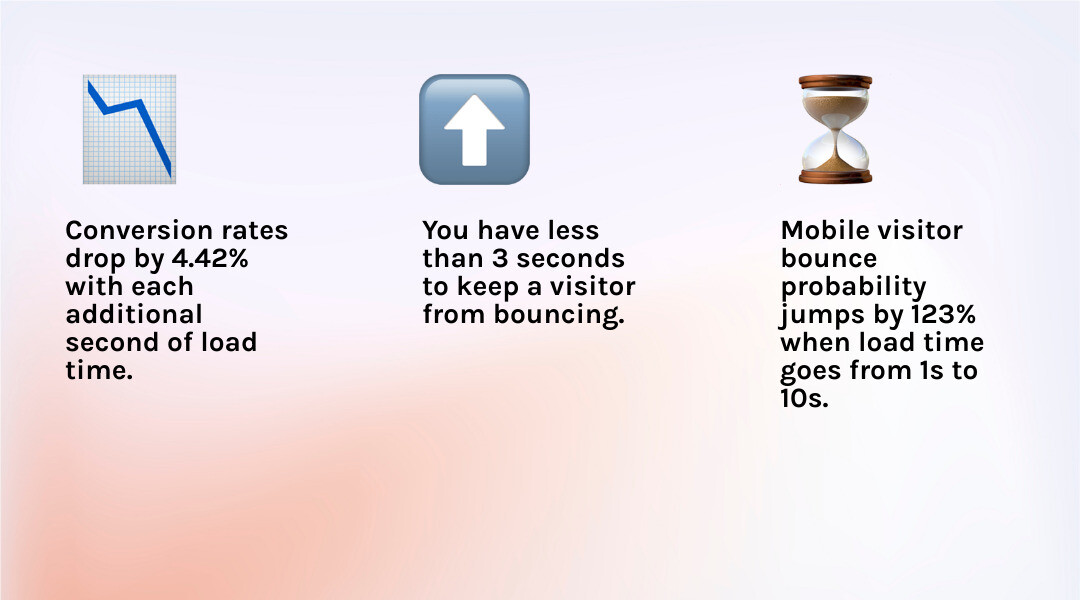
Your website’s loading speed can make or break your business. Research shows that you have less than 3 seconds to keep a visitor from bouncing. After that, impatience kicks in and potential customers leave for a competitor’s site.
The numbers tell a stark story. Website conversion rates drop by an average of 4.42% with each additional second of load time between seconds 0-5. When page load time stretches from 1 second to 10 seconds, the probability of a mobile visitor bouncing jumps by 123%.
But it’s not just about keeping visitors around. Google has made page speed a confirmed ranking factor for both desktop and mobile search. Faster sites rank higher, get crawled more efficiently, and deliver the kind of user experience that search engines reward.
The good news? You don’t need to be a developer to make meaningful improvements. Most page speed issues come down to a handful of fixable problems: oversized images, bloated code, slow servers, and inefficient resource delivery.
This guide walks you through practical, actionable steps to diagnose your current performance and implement fixes that actually move the needle. Whether you’re running an e-commerce store, a local service business, or a B2B website, these strategies will help you create a faster, more competitive online presence.
First, Measure: How to Diagnose Your Website’s Performance
Before you can fix what’s broken, you need to understand what’s slowing your website down. Measuring your current performance is the crucial first step to improve page speed. Think of it as a health check for your website; it establishes a baseline and points to areas needing immediate attention.
Several powerful tools are available to help you diagnose performance issues. Google’s own suite of tools, such as PageSpeed Insights, Google Lighthouse, and Chrome DevTools, are indispensable for this purpose. These tools provide comprehensive reports, offering scores and actionable suggestions for improvement.
When evaluating performance, it’s important to distinguish between “lab data” and “field data.” Lab data, generated by tools like Lighthouse, simulates a user’s experience under controlled conditions. It’s excellent for debugging and consistent testing. Field data, on the other hand, comes from real users visiting your site, providing a more accurate picture of actual performance across various devices and network conditions. This distinction is vital because what looks fast in a lab might still be sluggish for real users.
Similarly, there’s a difference between synthetic monitoring and Real User Monitoring (RUM). Synthetic monitoring uses automated scripts to simulate user interactions and collect performance data, offering consistent, repeatable measurements. RUM, like that offered by Google Analytics, collects data directly from actual user sessions, reflecting real-world performance. Both have their place in a comprehensive strategy to improve page speed.
Understanding Core Web Vitals
At the heart of Google’s performance measurement are the Core Web Vitals. These are a set of three user-centric metrics that quantify key aspects of the user experience: loading, interactivity, and visual stability. They are not just arbitrary numbers; they are direct signals Google uses in its search ranking algorithms, making them paramount for SEO.
Let’s break them down:
- Largest Contentful Paint (LCP): This metric measures the time it takes for the largest content element (like a hero image or a large block of text) on your page to become visible within the viewport. A low LCP signals to users that your page is loading quickly. The recommended threshold for a good user experience is an LCP of 2.5 seconds or less.
- Interaction to Next Paint (INP): This measures a page’s overall responsiveness to user interactions. It assesses the latency of all clicks, taps, and keyboard interactions with a page. Pages with low INP signal to users that a page responds quickly when they interact with them, making your website feel more reliable and delightful to use. Imagine clicking a button and nothing happening for a second – that’s high INP. Improvements in INP can have significant business benefits. For instance, QuintoAndar increased year-over-year conversions by 36% by improving INP by 80%. Disney+ Hotstar increased weekly card views by 100% by reducing INP by 61% on living room devices.
- Cumulative Layout Shift (CLS): This metric quantifies the unexpected shifting of visual page content. Have you ever tried to click a button, only for the entire layout to suddenly move, causing you to click something else? That’s high CLS. Pages with low CLS signal to users that a page’s layout is stable and won’t change unexpectedly as they try to interact with it.
To achieve good Core Web Vitals, aim for the 75th percentile of page loads to meet these thresholds. You can find more detailed criteria for these metrics at web.dev.
Key Metrics Beyond Core Web Vitals
While Core Web Vitals are critical, other metrics offer additional insights into your website’s performance:
- Time to First Byte (TTFB): This measures the time it takes for your browser to receive the first byte of response from the server after making a request. It’s essentially how long the server takes to respond. A TTFB below 200ms is considered great. The 200ms to 500ms range is normal and okay, but consistently higher than 600ms will need investigation. The main factor under your control when it comes to TTFB is server processing time, which can be optimized by improving application logic, database queries, and server hardware.
- First Contentful Paint (FCP): This measures the time from when the page starts loading to when any part of the page’s content is rendered on the screen. It’s the first moment a user sees something on your page, even if it’s just a logo or a header.
- Time to Interactive (TTI): This metric measures the time until a page is fully interactive, meaning visual elements are rendered, and the page can reliably respond to user input. It’s a good indicator of how quickly users can actually do things on your page.
By monitoring these metrics, you get a holistic view of your website’s performance, enabling you to pinpoint specific issues and effectively improve page speed.
Core Strategies to Improve Page Speed
Once you’ve identified your website’s performance bottlenecks, it’s time to implement solutions. Many of these strategies are best practices for any website aiming for a superior user experience and better search engine rankings. For businesses in Canton, OH, or anywhere else, these core strategies are universally effective in enhancing your online presence.

MDM Marketing understands that mastering effective web marketing strategies, including page speed optimization, is crucial for modern needs. You can learn more about this at Mastering Effective Web Marketing Strategies for Modern Needs.
Optimize Images and Media
Images often account for the largest portion of a page’s total file size, making them prime targets for optimization.
- Image Compression: This is about reducing the file size of your images without significantly compromising their visual quality. Tools can help you compress images before uploading them. For example, a 6.1 MB image can be reduced to 633 kB after resizing and compression.
- Resizing Images: Ensure your images are never larger than their display dimensions. Sending a 4000px wide image to a 400px wide display is wasteful. Create multiple sizes of each image during the build process and then use
srcsetin your code. This allows the browser to select the appropriate image based on screen resolution. A good guide for this is Using responsive images correctly. - Modern Formats: Accept next-generation image formats like AVIF and WebP. These formats offer superior compression compared to older JPEGs and PNGs, leading to smaller file sizes and faster load times. AVIF became Baseline Newly available in January 2024, indicating broad browser support.
- Lazy Loading: This technique defers the loading of images and videos that are not currently in the user’s viewport. Instead of loading everything at once, content only loads as the user scrolls down, significantly improving initial page load times.
- CSS Sprites: For frequently used small images like icons, combine them into a single image file known as a CSS sprite. This reduces the number of HTTP requests the browser needs to make, saving load time.
Here’s a quick list of image optimization best practices:
- Choose the right format (WebP/AVIF for photos/graphics, PNG for graphics with transparency, JPEG for complex photos).
- Compress images to reduce file size.
- Serve responsive images using
srcsetandsizesattributes. - Lazy-load offscreen images and videos.
- Use image CDNs to dynamically optimize and serve images.
- Replace animated GIFs with video formats (like MP4) for better performance.
Streamline Your Code (CSS, JavaScript, & HTML)
Bloated code can significantly drag down your page speed. Cleaning it up is essential.
- Minification: This process removes unnecessary characters (like whitespace, comments, and redundant code) from your HTML, CSS, and JavaScript files without changing their functionality. This makes the files smaller and quicker to download.
- Gzip Compression: Gzip is a file format and a software application used for file compression and decompression. Enabling Gzip compression on your web server allows it to send compressed versions of your HTML, CSS, and JavaScript files to browsers, which then decompress them. This can dramatically reduce file sizes, especially for text-based content. Anything larger than 150 bytes should be compressed.
- Removing Unused Code: Over time, websites accumulate unused CSS and JavaScript. Tools like Chrome DevTools’ Coverage tab can help you identify these unused portions. Eliminating them reduces file sizes and parsing time.
- Asynchronous Loading and Defer JavaScript: When a browser encounters a
<script>tag, it typically stops parsing the HTML, executes the script, and then continues. This is “render-blocking” behavior. To avoid this, use theasyncordeferattributes for your JavaScript files.asyncscripts execute as soon as they are loaded, without blocking HTML parsing.deferscripts download in the background and execute after the HTML has been fully parsed. Google suggests avoiding and minimizing render-blocking JavaScript; learn more at Remove render-blocking JavaScript. - Reduce Plugins: If you’re using a Content Management System (CMS), plugins can add significant overhead. Each plugin often loads its own CSS, JavaScript, and other assets, increasing HTTP requests and file sizes. Regularly audit your plugins and remove any that are unnecessary or inefficient.
Improve Server & Network Delivery
Even the most optimized front-end won’t save a website with a slow server or inefficient network delivery.
- Browser Caching: Browsers can store copies of static files (like stylesheets, images, and JavaScript) locally. When a user revisits your site, the browser doesn’t have to reload these entire pages, leading to much faster load times. You can instruct browsers how long to cache these files by setting “expires” headers. For example, you might set an expiration date for a year if your site’s design doesn’t change frequently. Learn how to Set your “expires” header for caching.
- Content Delivery Network (CDN): A CDN is a network of geographically distributed servers. When a user requests content from your website, the CDN delivers it from the server closest to them. This drastically reduces latency and speeds up content delivery, especially for users far from your main hosting server. Serving static files can get tricky, and outsourcing this to a CDN is a smart move.
- Server Response Time: This is the time it takes for your web server to respond to a browser’s request. As mentioned, an optimal server response time is under 200ms. Factors affecting this include the amount of traffic, the resources each page uses, the server software, and your hosting solution. Improving server-side application logic, optimizing database queries, and ensuring adequate server memory can significantly reduce TTFB.
- HTTP/2: Ensure your server supports HTTP/2, the successor to HTTP/1.1. HTTP/2 has several advantages, including the ability to send multiple files simultaneously over a single connection, which avoids the overhead of multiple requests. This multiplexing feature can greatly improve page speed.
- Reduce Redirects: Each redirect (e.g., from
http://example.comtohttps://www.example.com) adds an extra round trip time for the browser to complete the request. Minimizing redirects can directly reduce the time a visitor waits for your page to load. - Choose the Right Hosting: Your hosting service plan plays a massive role in your website’s speed. Shared hosting, while cheap, often means your site shares resources with many others, leading to subpar performance. For better speed and reliability, consider Virtual Private Servers (VPS), dedicated servers, or cloud hosting solutions. MDM Marketing can help you streamline your SEO efforts, including considerations for hosting, as part of their outsourced services.
Advanced Tuning and Long-Term Maintenance
Improving page speed isn’t a one-time task; it’s an ongoing commitment. Advanced techniques and continuous monitoring ensure your website remains fast and competitive over time.

How to improve page speed with a performance budget
A performance budget is a set of quantifiable limits for various performance metrics that your website must adhere to. Think of it as a financial budget, but for your website’s speed. By defining these thresholds, you can prevent performance regressions as new features or content are added.
- Setting Thresholds: This involves setting limits for metrics like page load time, image weight, JavaScript bundle size, or Core Web Vitals scores. For example, you might set a budget that your LCP must never exceed 2.5 seconds, or your total image size for a page must not exceed 1MB.
- Asset Quantities: Budgets can also apply to the number or size of specific assets, such as the number of HTTP requests, font files, or third-party scripts.
- Timing Metrics: Focus on user-centric timing metrics like FCP, LCP, and TTI.
- Preventing Regression: Once established, performance budgets can be integrated into your development workflow. Tools like Lighthouse CI can automate checks, failing builds if they exceed the defined budget. This proactive approach helps maintain speed over time.
How to improve page speed by managing third-party resources
External scripts and third-party resources (like analytics, ads, social media widgets, or chat applications) can significantly impact your website’s speed. While often essential, they need careful management.
- Audit External Scripts: Regularly review all third-party scripts loaded on your site. Understand their purpose and their impact on performance. Some scripts might be critical, while others could be removed or loaded differently.
- Asynchronous Loading: Whenever possible, load third-party scripts asynchronously. This prevents them from blocking the rendering of your main page content.
- Tag Managers: Use a tag manager (like Google Tag Manager) to consolidate and control third-party scripts. This allows you to manage when and how these scripts fire, reducing their direct impact on initial page load.
- Impact on Performance: Be aware that third-party scripts can contribute to render-blocking issues, increase network requests, and consume main thread time. For example, some analytics scripts, if not implemented correctly, can slow down your site. MDM Marketing helps clients with SEO for Construction Companies and understands the importance of managing all aspects of a website, including third-party resources, for optimal performance.
Other advanced techniques include:
- Mobile-First Coding: Designing and optimizing your website for mobile devices first. This approach ensures a lean, fast experience for the majority of users, and then scales up for desktop.
- Prefetching, Preconnect, Prerender: These are browser hints that tell the browser to perform actions in anticipation of a user’s next move.
dns-prefetch: Resolves DNS for a domain that will be used later.preconnect: Establishes a connection to a domain that will be used later (DNS lookup, TCP handshake, TLS negotiation).prefetch: Fetches a resource that will likely be needed for a future navigation.prerender: Renders an entire page in the background, making navigation instantaneous if the user clicks on it.
- Web Font Optimization: Web fonts can be large files. Optimize them by subsetting (only including characters you need), using
font-display: swapto prevent invisible text during loading, and preloading critical fonts.
Frequently Asked Questions about Page Speed
What is a good page speed score?
A good page speed score on tools like Google PageSpeed Insights is typically 90 or above for both mobile and desktop. However, it’s more crucial to focus on passing the Core Web Vitals thresholds (LCP under 2.5s, INP under 200ms, CLS under 0.1). A load time under 3 seconds is generally considered good and is crucial for retaining visitors. The context also matters: a complex e-commerce site might have different expectations than a simple blog.
How does page speed affect my SEO?
Page speed is a confirmed ranking factor for Google Search. A faster website improves user experience, which directly influences key SEO signals like bounce rate (users leaving quickly) and dwell time (how long users stay on your page). Google rewards sites that provide a good user experience with higher rankings. Furthermore, a faster site is easier for Google’s crawlers to process, ensuring that more of your content is indexed efficiently. This makes speed an integral part of any comprehensive SEO strategy, including activities like Insights on How to Build Quality Backlinks for SEO Growth.
Can I improve my website speed without being a developer?
Yes, absolutely! Many impactful changes to improve page speed don’t require deep coding knowledge:
- Use optimization plugins: If you use a popular Content Management System (CMS), there are many plugins designed to handle caching, image optimization, and code minification for you.
- Choose a high-quality hosting provider: Investing in better hosting (VPS, dedicated, or cloud) can significantly boost your server response time.
- Use a CDN service: CDNs automatically serve your content from servers closer to your users, requiring minimal setup.
- Compress images before uploading: Numerous online tools and desktop software can help you reduce image file sizes without quality loss.
- Remove unnecessary content: Delete old plugins, themes, images, or pages that are no longer needed.
For more technical tasks like advanced code minification, server-side optimizations, or debugging complex render-blocking issues, you might benefit from professional help.
Conclusion: Make Speed a Priority for Sustainable Growth
As we’ve explored, your website’s speed is far more than just a technical detail; it’s a critical component of user experience, conversion rates, and your overall SEO performance. In today’s digital world, users expect instant access to information. Websites that fail to deliver this quickly risk losing customers and falling behind competitors.
The business case for speed is undeniable. A fast website builds trust, reduces bounce rates, encourages engagement, and ultimately drives conversions and sales. By consistently striving to improve page speed, you are investing in a more robust, user-friendly, and profitable online presence.
This journey of optimization is continuous, requiring regular monitoring and adjustments. For businesses in Canton, OH, and beyond, ensuring your website is blazing fast is no longer optional—it’s fundamental to sustainable growth. If you find yourself overwhelmed by the technical intricacies or simply want to ensure your website is performing at its peak, consider partnering with a professional agency like MDM Marketing. We can help diagnose and fix complex performance issues, integrating speed optimization into your comprehensive SEO needs for lasting success.
About Jay McCullough
This author hasn't written a bio yet.