
Why Your Website Needs to Work on Every Screen
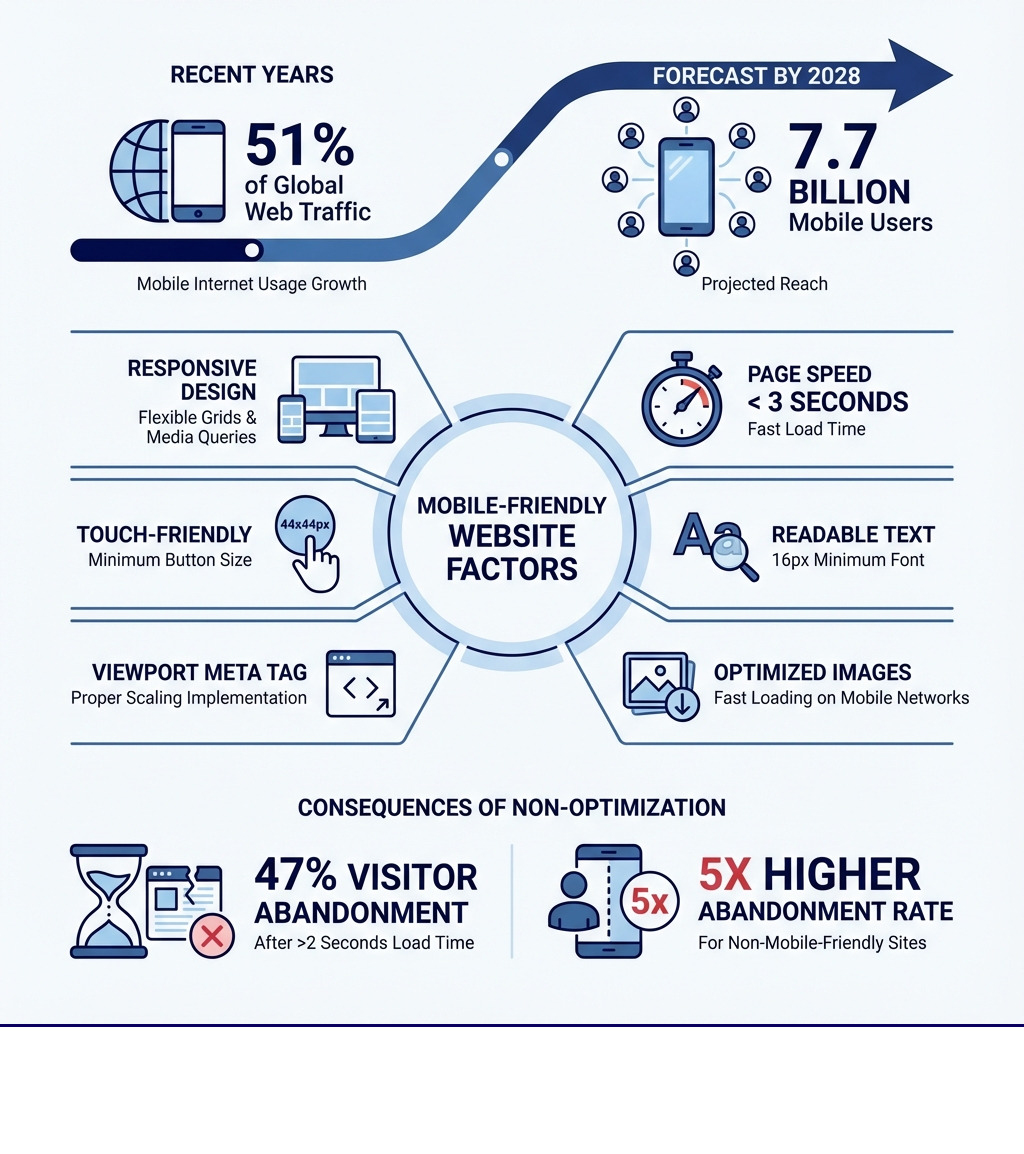
A mobile friendly website automatically adapts to any screen size—phone, tablet, or desktop. This allows visitors to browse, read, and take action without zooming or scrolling sideways. It loads fast, looks clean, and makes navigation effortless on any device.
To create a mobile-responsive site, you need:
- Responsive design using flexible grids and CSS media queries
- Fast page speed (under 3 seconds load time)
- Touch-friendly buttons (minimum 44×44 pixels)
- Readable text without zooming (16px minimum font size)
- The viewport meta tag to ensure proper scaling
- Optimized images that load quickly on mobile networks
The numbers tell a clear story. More than half of all web traffic now comes from mobile devices, and that number is forecast to reach 7.7 billion mobile users by 2028. If your website isn’t built for small screens, you’re losing visitors—and potential customers—every single day.
Here’s the reality: 47% of visitors abandon a website if it takes more than 2 seconds to load, and if your site isn’t mobile-friendly, visitors are 5 times more likely to leave. Google knows this, which is why they prioritize mobile-friendly sites in search results through mobile-first indexing.
Your website is more than a digital brochure; it’s your 24/7 sales team and first impression. Visitors expect a seamless experience on any device, whether they find you through Google, social media, or email. It’s often the deciding factor between you and a competitor.
The good news? Making your website mobile-friendly isn’t as complicated as it sounds. With the right approach—responsive design, speed optimization, and user-focused navigation—you can create a site that works beautifully everywhere.
Why a Mobile-Friendly Website is Non-Negotiable
A website is a key tool for growth. Since most users browse on mobile devices, a mobile friendly website is no longer optional—it’s essential. Neglecting mobile optimization leads to frustrated users, poor search rankings, and lost revenue.

It’s not just about looks; it’s about functionality. A site that doesn’t adapt to mobile screens forces users to deal with tiny text, awkward layouts, and buttons that are hard to tap. This causes immediate frustration and high bounce rates.
Beyond the immediate user experience, the ripple effects of a non-mobile-friendly site extend into critical areas like search engine rankings and conversion rates. Google, the gatekeeper of online visibility, has made it abundantly clear that mobile-friendliness is a significant ranking factor. This means that a site that isn’t optimized for mobile is essentially invisible to a large segment of the online audience.
Furthermore, statistics show that the bounce rate probability increases by 32% as page load time goes from one to three seconds, highlighting the need for speed and mobile-friendliness. For businesses in Canton, OH, a seamless mobile experience is crucial for connecting with customers.
Thriving online requires a mobile-first mindset, optimizing for the devices your audience uses most. If you’re ready to improve your digital strategy, MDM Marketing offers Strategic Marketing Services to boost visibility and engagement.
The SEO Advantage: Google’s Mobile-First Indexing
Google’s mobile-first indexing has changed SEO. Google now primarily uses the mobile version of a site for indexing and ranking, not the desktop version. If your mobile site is slow, hard to steer, or missing content, your search visibility will suffer.
A mobile friendly website signals a good user experience to search engines. Google prefers indexing and ranking mobile-friendly websites, making it a critical ranking factor. Since over half of Google searches are on mobile, optimization is key for organic traffic. Today, mobile optimization is a foundational part of SEO.
Enhancing User Experience and Reducing Bounce Rates
User experience (UX) is at the heart of a successful website, especially on mobile. A seamless experience allows visitors to steer easily, read content without squinting, and interact with elements effortlessly. A poor mobile UX, however, causes significant user frustration.
Trying to tap a tiny button or fill a small form on a smartphone is a barrier to engagement. Research shows that if a site isn’t mobile-friendly, visitors are 5 times more likely to leave. This high bounce rate signals a poor user experience to search engines, which harms your SEO.
A mobile friendly website solves these problems with legible text, large touch targets, and intuitive navigation, like hamburger menus. This focus on usability keeps users engaged longer, encouraging them to explore your site and convert. To learn more, explore Mastering Effective Web Marketing Strategies.
How a mobile friendly website drives conversions
The goal of most websites is to drive conversions—whether that’s a sale, a contact form submission, or a newsletter signup. A mobile friendly website directly impacts your conversion rates by streamlining the customer journey. When a site is easy to use on mobile, visitors are more likely to stay, explore, and convert.
Consider the visibility of your call-to-action (CTA) buttons. On a non-mobile-friendly site, CTAs might be tiny or off-screen. A mobile-optimized site ensures CTAs are prominent and easy to tap. Simplified forms also reduce friction for users, boosting lead generation. E-commerce is particularly sensitive to mobile optimization; if checkout is cumbersome on a phone, customers will abandon their carts.
The speed of your site also plays a critical role in conversions. Studies consistently show that even minor delays in page response can significantly hurt conversion rates. A slow, non-mobile-friendly site is actively costing your business money. By prioritizing mobile-friendliness, you’re not just improving user experience; you’re directly enhancing your bottom line. To see how MDM Marketing has helped businesses achieve significant results, review our successful Use Cases.
The Core Pillars of Mobile-Friendly Design
Creating a truly mobile friendly website rests on three pillars: responsive design, speed optimization, and intuitive user interface (UI). These elements work together to create a seamless experience on all devices, and neglecting one can undermine the others.

These principles are a holistic approach to web design, ensuring your site looks good, performs well, and guides users to their goals. Understanding them is the first step to building a standout digital presence. To learn more, explore Responsive Design fundamentals.
Understanding Responsive Web Design (RWD)
Responsive Web Design (RWD) is the cornerstone of mobile-friendliness. As defined by Ethan Marcotte in 2010, RWD uses fluid grids, flexible images, and media queries to create web pages that automatically adapt to any screen size.
The beauty of RWD lies in its “single codebase” approach. Instead of maintaining separate websites for desktop and mobile, a responsive site uses the same HTML code across all devices, with CSS (Cascading Style Sheets) adjusting the layout based on screen characteristics. This simplifies maintenance, improves SEO, and ensures consistency.
Here’s a quick comparison of different approaches to mobile web presence:
| Feature | Responsive Design | Adaptive Design | Mobile-Only Site |
|---|---|---|---|
| Definition | Single design that flexes to fit any screen size. | Multiple fixed layouts based on specific breakpoints. | Separate, dedicated website for mobile users. |
| Codebase | Single | Multiple (per breakpoint) | Separate from desktop site |
| Maintenance | Easier (one site to update) | Moderate (multiple layouts to manage) | Complex (two distinct sites) |
| Flexibility | Highly flexible, adapts to unknown sizes | Less flexible, relies on predefined sizes | Limited to specific mobile devices |
| SEO Impact | Google preferred (single URL, content consistency) | Good, but can be more complex | Can dilute SEO if not implemented carefully (duplicate content concerns) |
| User Experience | Seamless across all devices | Good for targeted device groups | Highly optimized for mobile, but often limited content |
For most businesses, especially those leveraging digital marketing for growth in areas like Canton, OH, RWD offers the most efficient and effective path to mobile adaptability.
The Need for Speed: Optimizing for Mobile Performance
Speed is a necessity for a mobile friendly website. Mobile users are impatient; studies show that after three seconds of loading, user retention drops dramatically, and nearly half of all visitors will leave. The ideal load time for a mobile site is under three seconds.
Beyond user retention, speed is also a direct SEO factor. Google considers high speed a positive ranking factor, penalizing slow sites. This is particularly true for Core Web Vitals, a set of metrics Google uses to evaluate user experience. These include:
- Largest Contentful Paint (LCP): Measures loading performance (aim for under 2.5 seconds).
- First Input Delay (FID) / Interaction to Next Paint (INP): Measures interactivity (aim for under 100 milliseconds for FID, under 200 milliseconds for INP).
- Cumulative Layout Shift (CLS): Measures visual stability (aim for under 0.1).
Caching and Content Delivery Networks (CDNs) are crucial for achieving these speeds. Caching stores copies of your site’s files to reduce load times for repeat visitors. CDNs distribute your content across a global network of servers, delivering it from the location closest to the user. This ensures fast delivery for all visitors, whether global or local, by serving content from a nearby server.
Crafting an Intuitive Mobile User Interface (UI)
A mobile friendly website doesn’t just adapt its layout; it rethinks how users interact with its content. Crafting an intuitive mobile UI means designing for touch, small screens, and on-the-go usage.
Key elements of an intuitive mobile UI include:
- Hamburger Menus: These icons condense navigation into a single tappable element, saving screen space.
- Thumb-Friendly Design: Place key buttons and navigation within the ‘thumb zone’—the area easily reached by a user’s thumb.
- Appropriate Touch Targets: Buttons and links must be easy to tap. The Web Content Accessibility Guidelines (WCAG) recommend a minimum touch target of 44×44 pixels with sufficient spacing to prevent misclicks.
- Legible Fonts: Use clear, readable fonts. A minimum of 16px for body text is recommended, with adequate line height (around 1.5x the font size) to improve readability.
- High Contrast: Ensure text has high contrast against its background. WCAG recommends a contrast ratio of at least 4.5:1 for normal text to ensure readability in all lighting conditions.
- Simplified Navigation: Simplify the overall navigation. Reduce the clicks needed to reach key information and provide clear paths back to the homepage.
By focusing on these UI best practices, you create a mobile experience that feels natural and effortless, minimizing frustration and encouraging users to engage deeply with your site.
How to Build and Test Your Mobile-Friendly Website
Building a mobile friendly website involves both technical implementation and rigorous testing. It’s an iterative process that ensures your site not only adapts to different screen sizes but also performs optimally and provides an excellent user experience across all devices.

The journey to mobile-friendliness starts with understanding your current site’s performance and then systematically applying best practices, followed by comprehensive testing.
Step 1: Auditing Your Current Site’s Mobile-Friendliness
Before you can fix what’s broken, you need to know what needs fixing. An initial audit is crucial.
- Use a Mobile-Friendly Test: Enter your URL into a tool like Google’s Mobile-Friendly Test for a quick pass/fail grade. It identifies basic issues like small text or incorrect viewport settings.
- Run a Lighthouse Audit: Use the free Lighthouse tool in Chrome DevTools for a comprehensive report on performance, accessibility, SEO, and mobile-friendliness with actionable insights.
- Check Responsiveness Visually: Use an online responsive test tool to view your site on dozens of screen sizes for a visual check of your layout’s adaptability.
- Test Manually on Devices: Tools are helpful, but always test on actual smartphones and tablets. Steer your site to check for ease of use, readability, and overall flow to catch issues automated tools miss.
- Analyze Performance: Use a tool like Google PageSpeed Insights to analyze mobile loading speed. Focus on Core Web Vitals to identify performance bottlenecks.
Step 2: Implementing Key Technical Elements for a mobile friendly website
Once you know where your site stands, it’s time to build its mobile-friendly foundation.
- Viewport Meta Tag: This critical piece of code tells mobile browsers how to control the page’s dimensions and scaling. Add
<meta name="viewport" content="width=device-width, initial-scale=1.0">to the<head>of your pages to ensure proper rendering on mobile devices. - CSS Media Queries: Media queries apply CSS styles based on device characteristics like screen width. They allow your design to adapt at specific ‘breakpoints,’ such as switching to a single-column layout on smaller screens.
- Flexible Layouts: Use relative units like percentages or
vwinstead of fixed pixels for layout elements to create a fluid design that adapts to different screen sizes. - CSS Flexbox and CSS Grid: These modern CSS modules are essential for responsive layouts. Flexbox is best for one-dimensional layouts (rows or columns), while CSS Grid is designed for complex two-dimensional layouts with rows and columns.
Step 3: Optimizing Media for Fast Mobile Loading
Images and videos are often the heaviest elements on a webpage, and if not optimized, they can drastically slow down mobile load times.
- Image Compression: Compress images before uploading using image compression tools to reduce file size without sacrificing quality.
- Lazy Loading: Use lazy loading for images and videos below the fold. This defers loading non-visible assets until the user scrolls, speeding up initial page load.
- Modern Image Formats: Use modern image formats like WebP or AVIF for better compression and faster loading than JPEG or PNG.
- Video Optimization: Embed videos from platforms like YouTube or Vimeo. For self-hosted videos, ensure they are compressed and properly formatted.
- Minifying CSS & JavaScript: Minify CSS and JavaScript files to remove unnecessary characters like whitespace and comments. This reduces file size and download times.
Step 4: Ensuring Cross-Device and Browser Compatibility
The mobile ecosystem is incredibly diverse. Ensuring your mobile friendly website works consistently across this fragmented landscape is crucial.
- Cross-Browser Testing: Test your site on popular mobile browsers like Chrome, Safari, and Firefox for consistent performance.
- Device Fragmentation: Your responsive design must work across a wide spectrum of screen sizes, from small phones to large tablets, not just a few breakpoints.
- Portrait vs. Landscape Orientation: Test your site in both portrait and landscape modes to ensure the layout adapts correctly when the orientation changes.
- Real Device Testing: Emulators are useful, but real device testing is essential. Use actual devices or real device testing platforms to find touch-related issues and performance quirks that simulators might miss.
Common Pitfalls to Avoid in Mobile Design
Even with the best intentions, it’s easy to stumble into common traps when designing for mobile. Avoiding these pitfalls is as important as implementing best practices to ensure your mobile friendly website truly delivers.

- Intrusive Pop-ups: Avoid intrusive pop-ups on mobile. They often cover the screen, are hard to close, and cause users to leave. Google penalizes sites for them. If necessary, use them subtly.
- Hiding Content: Don’t hide important content on mobile. Mobile users need the same information as desktop users. Prioritize and condense content, or use expandable sections like accordions.
- Small Fonts and Low Contrast: Small fonts and low contrast hurt readability, especially in bright light. Prioritize legibility and accessibility.
- Tiny Touch Targets and Close Links: Ensure buttons and links are large enough (at least 44×44 pixels) and have enough space between them to prevent frustrating mis-taps.
- Outdated Technology (Flash): Avoid Adobe Flash, as it’s unsupported on most mobile devices. Use modern web standards like HTML5, CSS3, and JavaScript instead.
- Excessive Scrolling (Horizontal): Horizontal scrolling is a sign of a non-responsive layout and frustrates users. Ensure all content fits the screen’s width.
- Lack of Clear CTAs: Make your calls-to-action (CTAs) clear, prominent, and easy to tap on mobile to avoid missing conversion opportunities.
By being aware of these common mistakes, you can proactively design a more effective and user-friendly mobile experience.
Frequently Asked Questions about Mobile-Friendly Websites
What is the difference between a mobile-friendly and a responsive website?
While often used interchangeably, ‘mobile-friendly’ and ‘responsive’ have different meanings. A mobile-friendly website is a broad term for any site that works well on mobile. This can be achieved via:
- Responsive Web Design (RWD): A single site that automatically adapts its layout to fit any screen size. This is the recommended approach.
- Adaptive Design: Multiple fixed layouts that are served based on specific device screen sizes.
- Dedicated Mobile Site: A completely separate website (e.g., m.example.com) built for mobile users.
In short, all responsive sites are mobile-friendly, but not all mobile-friendly sites are responsive. RWD is Google’s recommended method, providing the best experience with a single URL and codebase.
How does a mobile-friendly site affect my SEO?
A mobile friendly website is crucial for SEO in several ways:
- Google’s Mobile-First Indexing: Google now uses the mobile version of your site for indexing and ranking. A poor mobile site hurts your rankings, even if your desktop site is perfect.
- Higher Search Rankings: Google directly uses mobile-friendliness as a ranking signal, boosting compliant sites in mobile search results.
- Lower Bounce Rates as a Positive Signal: A good mobile UX leads to lower bounce rates. Search engines see this as a positive signal, which can improve your rankings.
- Improved User Experience Metrics: Good scores on Core Web Vitals (LCP, INP, CLS), which measure user experience, are a key part of technical SEO.
- Increased Mobile Traffic: Since over half of all searches are on mobile, a mobile-friendly site is essential to capture this traffic.
A non-mobile-friendly site severely handicaps your SEO and organic visibility.
What is the single most important factor for a mobile-friendly website?
While speed and UI are critical, the single most important factor for a mobile friendly website is responsive design.
Responsive design is the foundation that allows a site to adapt to any screen size. Without it, a site is fundamentally broken on mobile, making speed and UI optimizations ineffective. It creates the flexible ‘canvas’ on which a fast, user-friendly experience can be built.
While all three factors—responsive design, speed, and user experience—are deeply interconnected, responsive design is the essential starting point.
Conclusion
The journey to a mobile friendly website is no longer an option but a strategic imperative for any business aiming for sustainable growth in the digital age. From enhancing user experience and bolstering SEO to driving conversions and future-proofing your online presence, the benefits are undeniable. Adopting a mobile-first mindset ensures that your website is accessible, engaging, and effective for the vast majority of internet users.
By embracing responsive design, optimizing for speed, and crafting an intuitive mobile UI, businesses can create a powerful digital asset that performs seamlessly across all screens. This isn’t just about keeping up with trends; it’s about delivering value to your customers and securing your competitive edge.
For businesses in Canton, OH, and beyond, navigating web design and digital marketing can be challenging. MDM Marketing specializes in data-driven strategies to achieve measurable outcomes. Our expertise ensures your website is a high-performance engine for your business goals. For professional help creating a mobile-friendly website that drives results, explore our expert SEO services or contact us today.
About Jay McCullough
This author hasn't written a bio yet.