
Why Google Business Optimization Matters for Your Local Visibility
Google Business optimization is the process of managing and enhancing your Google Business Profile (GBP) to improve your visibility in local search results, attract more customers, and drive measurable actions like calls, direction requests, and website visits. When done right, it transforms your GBP into a powerful, free customer acquisition tool that works 24/7.
Quick Answer: Essential Steps for Google Business Optimization
- Claim and verify your Google Business Profile
- Complete every section with accurate, detailed information
- Choose specific categories that match your business offerings
- Add high-quality photos and videos regularly (at least weekly)
- Collect and respond to customer reviews consistently
- Post updates using Google Posts for events, offers, and news
- Monitor Q&A and seed questions to control the narrative
- Track performance using GBP Insights and adjust your strategy
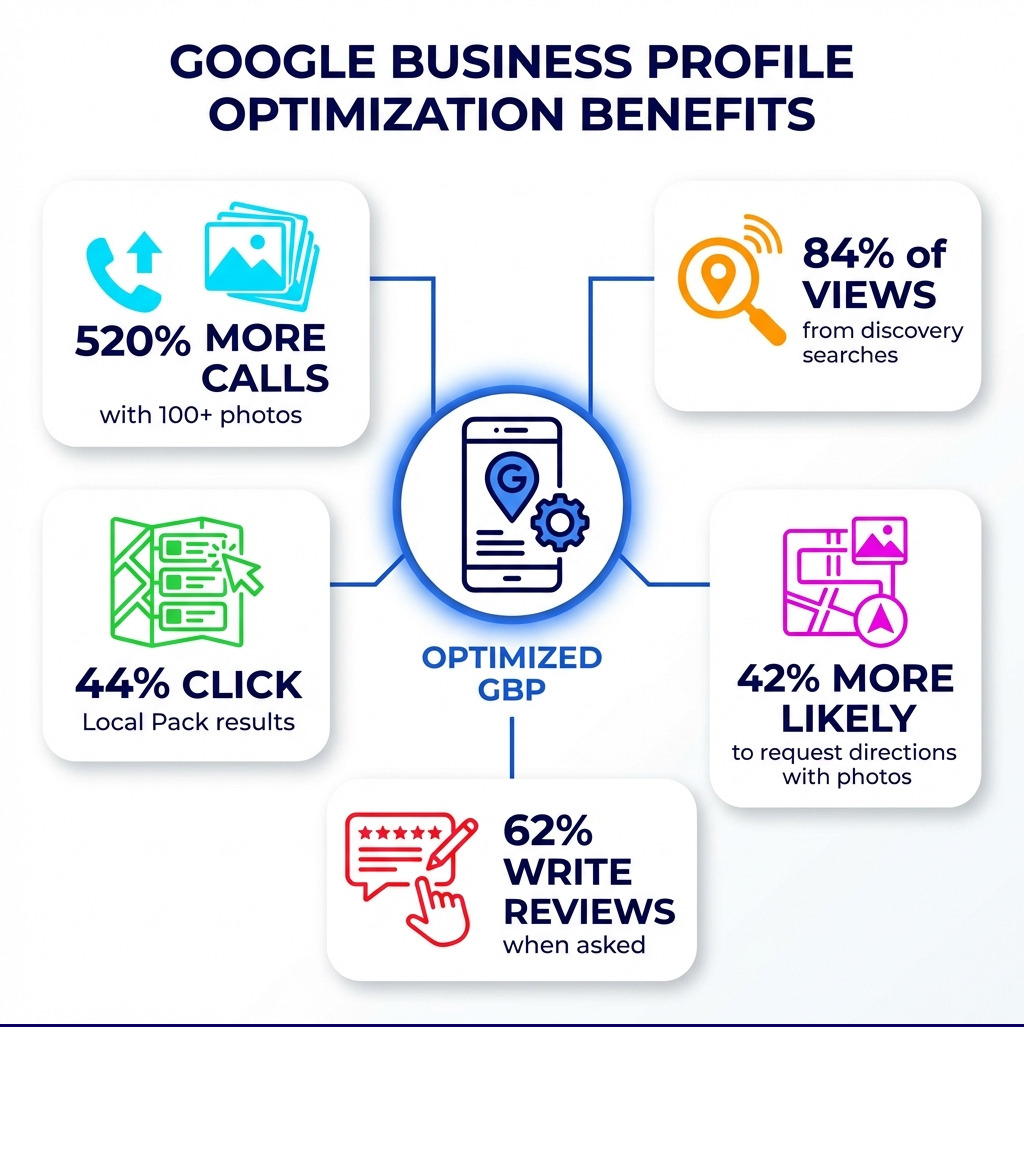
When someone searches for a business like yours, Google doesn’t just show a list of websites anymore. It shows a Local Pack – those three businesses at the top with their photos, ratings, and contact buttons. This prime real estate appears as the number one result 93% of the time.
Here’s what matters: 44% of people click on the Local Pack, compared to just 29% who click on regular organic results and 19% who click on paid ads.
Even more striking? One study revealed that 84% of Google Business Profile views come from findy searches – meaning people searching for “pizza near me” or “emergency plumber,” not your business name specifically. Only 16% of views come from direct searches where someone already knows your name.
This is why Google Business optimization isn’t optional anymore. It’s your digital storefront, often delivering the first impression potential customers get of your business. And unlike your website, which requires technical SEO knowledge and ongoing content creation, your GBP can be optimized in a weekend and maintained with just a few minutes per week.
The numbers speak for themselves: businesses with more than 100 photos get 520% more calls, 2,717% more direction requests, and 1,065% more website clicks than the average business. Customers are 42% more likely to request driving directions if your profile has photos, and 35% more likely to click through to your website.
Google Business optimization word roundup:
Understanding Google’s Local Ranking Factors
To truly master Google Business optimization, it’s crucial to understand how Google determines who shows up in the coveted Local Pack and local search results. Google’s local ranking algorithm is designed to connect searchers with the most relevant, nearby, and reputable businesses. While the exact formula remains a secret (to prevent manipulation), Google openly states that three core factors influence local rankings: relevance, distance, and prominence.
Relevance refers to how well your business profile matches what a user is searching for. If someone in Canton, OH searches for “Italian restaurant,” Google wants to show them an Italian restaurant, not a hardware store. Providing comprehensive and accurate information about your business and its offerings directly increases your relevance.
Distance is straightforward: how far your business is from the searcher’s location. If a user doesn’t specify a location (e.g., “pizza”), Google will calculate distance based on what it knows about their current location. For searches like “pizza Canton OH,” Google will focus on businesses within Canton. There’s no way to pay for a better local ranking; optimizing for distance means ensuring your address is correct and verified.
Prominence speaks to how well-known your business is. This isn’t just about your physical presence in Canton, OH; it’s also about your online reputation. Factors contributing to prominence include:
- Online reviews: Quantity, quality, and your responses to them.
- Links: From other reputable websites to yours.
- Local citations: Mentions of your business name, address, and phone number (NAP) across various online directories, which MDM Marketing can help you manage through their Google local citations services.
- Website SEO: How well your website ranks in organic search results. A strong overall web presence contributes to your local prominence.
Businesses with complete and accurate information are more likely to appear in local search results. Google explicitly provides tips to improve your local ranking on Google, emphasizing that diligent management of your profile is key. The interplay between your GBP and your website’s organic SEO is also vital; a well-optimized website, as discussed in SEO and GMB, strengthens your overall digital footprint.
How to Set Up and Claim Your Profile
Before you can start on your Google Business optimization journey, you need a Google Business Profile. It’s important to clarify a common point of confusion: What is the difference between a Google Business Profile and a Google My Business account? Previously, businesses managed their profiles through a platform called Google My Business. Today, that platform has evolved. Your Google Business Profile is the actual public listing that appears on Google Search and Maps, while the management interface has now largely shifted to direct editing within Google Search and Maps via what’s known as the New Merchant Experience (NMX).
Essential steps to claim and set up a Google Business Profile:
- Search for your business: Go to Google Search or Maps and type in your business name. If it appears, click “Own this business?” or “Claim this business.” If not, search for “my business” on Google and follow the prompts to create a new Google Business Account.
- Enter your business information: Provide your business name, category, address (if you have a physical location in Canton, OH), service areas, phone number, and website.
- Verify your business: This crucial step confirms you’re the legitimate owner. Google offers several verification methods:
- Postcard by mail: Google sends a postcard with a verification code to your business address. This is the most common method.
- Phone or text: Some businesses may be eligible for immediate verification via phone call or text message to their listed number.
- Email: Similar to phone verification, an email with a code is sent to an email address associated with your business.
- Google Search Console: If you’ve already verified your website with Google Search Console, you might be instantly verified.
Once verified, you’ll gain full control over your profile. You can also add a Business to My Google Business Manager to grant access to others who help manage your listing. The New Merchant Experience (NMX) allows you to make most edits directly from Search or Maps by simply searching for your business.
The Importance of Accurate Business Information (NAP)
Your Name, Address, and Phone number (NAP) are the bedrock of your local SEO. Inconsistent NAP information is a common mistake and can confuse both Google and potential customers. For businesses in Canton, OH, ensuring your NAP details are identical across all online platforms – your website, social media, online directories, and your Google Business Profile – is paramount.

Best practices for NAP:
- Match signage: Your business name on your GBP should exactly match your physical store signage.
- Consistency is key: Ensure your business name and address are consistent across all online directories and platforms. Variations like “St.” vs. “Street” can hinder Google’s ability to confidently associate your business with local searches.
- Service areas: If you’re a service-area business (e.g., a plumber who visits customers’ homes in Canton, OH, rather than having a storefront), clearly define your service areas instead of listing a physical address.
- Business hours: Always keep your regular operating hours up-to-date. Crucially, remember to update special hours for holidays or temporary closures. Nothing frustrates a potential customer more than showing up to a closed business.
- Phone number: Ensure your primary phone number is correct and actively monitored. If you’re facing issues like your Google Business Manager Keeps Declining My Phone Number Change, troubleshoot and resolve this promptly, as phone calls are a key action for local customers.
Accurate and consistent NAP information not only helps Google trust your business data, leading to better local rankings, but it also builds trust with your customers.
Core Google Business Optimization: A Step-by-Step Guide
Once your profile is claimed and verified, the real fun of Google Business optimization begins. Think of your Google Business Profile as a dynamic, interactive billboard that Google provides for free. To maximize its impact, you need to complete every section with thoughtful, strategic information. Businesses with complete and accurate info are more likely to show up in local search results.
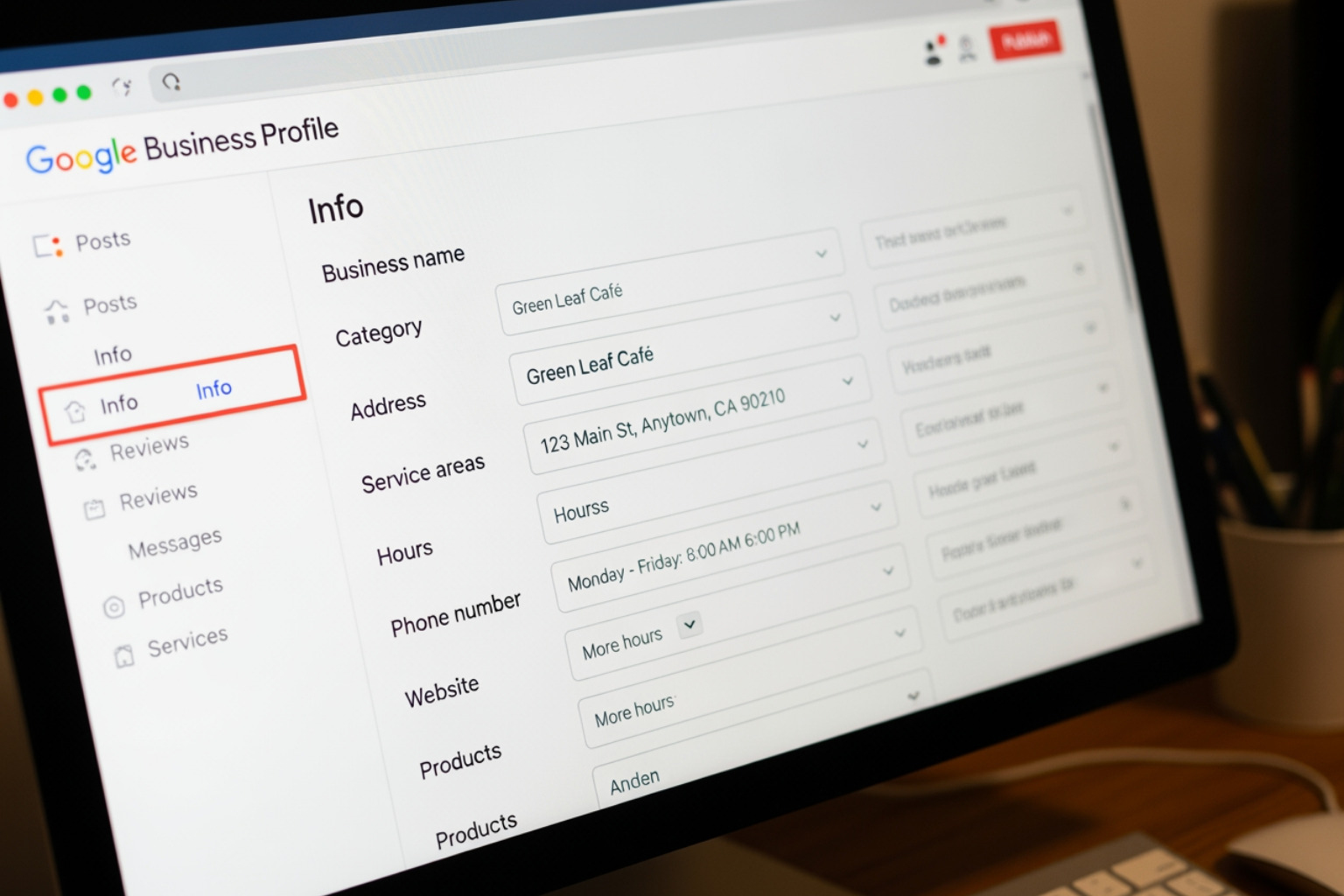
Your goal is to fill out as much of your profile as possible, adhering to the guidance provided by Google. A fully optimized profile provides searchers with all the information they need to choose your business, helping you to stand out from competitors in Canton, OH.
Choosing Categories and Attributes
Categories and attributes are critical for telling Google exactly what your business does and what unique features it offers. This is vital for findy searches.
- Primary Category: This is the most important classification. Be as specific as possible. For example, if you’re a nail salon in Canton, OH, choose “Nail Salon” rather than just “Salon.” If you’re an “Egyptian Restaurant,” don’t just put “Restaurant.” Google provides a comprehensive list of categories, so it’s worth searching for the most specific options related to your business.
- Secondary Categories: You can add up to nine additional categories to further describe your offerings. Use these to capture related services or products.
- Business Attributes: These are specific tags that highlight special features of your business. Attributes can be factual (e.g., “outdoor seating,” “Wi-Fi,” “wheelchair accessible”) or subjective (e.g., “popular for travelers,” “good for working on laptop”). Google’s attributes can get very granular, so it’s worth exploring them. Check out this attribute list to see what’s available. Adding relevant attributes can help your business show up in search results when users filter for specific features. For instance, if your Canton, OH, cafe is “good for working on laptop,” make sure to add that attribute!
Writing a Compelling Business Description
Your business description is your chance to tell potential customers in Canton, OH, what makes your business special. You have up to 750 characters, but only the first 250 characters are visible without clicking “more.”
- Front-load keywords: Naturally weave in important keywords related to your business and services in Canton, OH, especially in the first 250 characters.
- Highlight your unique value proposition: What makes your business different? What problems do you solve for your customers?
- Focus on key services: Briefly mention your core offerings.
- Avoid: Don’t use links or HTML, and don’t repeat information already present elsewhere in your profile. Focus on a clear, concise, and engaging narrative.
Showcasing Products and Services
For many businesses, the Products and Services sections are underused goldmines for Google Business optimization. These sections allow you to detail exactly what you offer, directly within your Google Business Profile.
- Product Editor: If you sell physical goods, use the product editor to list your products with photos, descriptions, and prices. This helps customers find what you offer right from the search results, potentially driving sales directly.
- Service Menu: For service-based businesses in Canton, OH, detail your services. This is especially useful for showing the breadth of your offerings.
- Add photos and prices: Visuals are key! Include high-quality photos for each product, and clear pricing information for both products and services.
This feature allows customers to learn about your offerings without even visiting your website, increasing the likelihood of a direct inquiry or visit.
Engaging Customers and Building Social Proof
An optimized Google Business Profile isn’t a “set it and forget it” task. Active profile management and engaging with customers are crucial for building trust and increasing conversions. This ongoing effort is part of a robust Google Business optimization strategy, and MDM Marketing offers comprehensive GMB Optimization Services to help businesses maintain peak performance.
Mastering Google Reviews
Google knows that reviews are the #1 influence on consumer buying, making them a key ranking factor in their algorithm. Positive reviews are essentially free advertising and powerful social proof.
How to get more Google reviews (Q7):
- Just ask! A significant 62% of customers will write a review if asked. Do so via email, text, social media, and in-person conversations.
- Make it easy: Create a review shortcut link to provide customers with a direct path to leave a review.
- Email campaigns: Include a review request in your post-purchase or post-service emails.
- In-store prompts: Use signage or QR codes at your Canton, OH, location.
- Website integration: Have a “Reviews” page on your website with a clear call to action.
Responding to reviews effectively (Q7):
- Respond to all reviews: Both positive and negative. Replying shows you value customer feedback, and Google confirms that responding to reviews improves your local SEO.
- For positive reviews: Express gratitude and, if possible, mention something specific about their experience. For example, “Thank you, Sarah, for your kind words! We’re so glad you enjoyed our Canton-style pizza.”
- For negative reviews: Respond professionally and empathetically. Apologize for any negative experience, offer to resolve the issue offline, and provide contact information. Never get defensive, and avoid censoring negative reviews (unless they are clearly fraudulent, which you should report). 62% of consumers will not support brands that censor reviews.
Leveraging Photos and Videos
Visual content makes your Google Business Profile come alive and significantly impacts customer engagement. Customers are 42% more likely to request driving directions to a business if its Business Profile has photos, and 35% more likely to click through to its website. Businesses with more than 100 photos get 520% more calls, 2,717% more direction requests, and 1,065% more website clicks than the average business.
Best practices for photos and videos (Q8):
- Logo and Cover Photo: Use your logo as your profile’s thumbnail and a high-quality, brand-representative image as your cover photo.
- Variety is key: Upload interior and exterior shots of your Canton, OH, location, photos of your team in action, happy customers (with their permission!), and your products/services.
- Quality matters: Use clear, well-lit, high-resolution images. Avoid stock photos or heavily filtered images; Google wants to see your business as it appears in the real world.
- Geo-tag photos: While not a direct ranking factor, geo-tagging photos can reinforce your local relevance.
- Videos: Short, engaging videos (e.g., a walkthrough of your premises, a quick “meet the team” video) can significantly boost engagement. You can even add a 360º photo using Google’s Street View app.
- Regular updates: Aim to upload at least one new photo every week. This signals to Google that your profile is active and up-to-date. Always refer to Google’s photo guidelines for specifications.
Using Google Posts and Q&A for Timely Updates
Google Posts and the Q&A section are dynamic features that allow for ongoing interaction and information sharing, crucial for Google Business optimization.
- Google Posts (Q9): These are like mini-blog posts or social media updates directly on your GBP. They appear in your profile and can even show up in search results. Use them to announce:
- Offers: Promotions, discounts, sales.
- Events: Grand openings, workshops, special dates in Canton, OH.
- Updates: New products, services, changes in hours.
- “What’s New”: General news and announcements.
Always include a clear call-to-action (CTA) button, such as “Learn More,” “Order Online,” or “Call Now.” Posts increase the number of actions taken by consumers who find your profile.
- Q&A Section (Q10): This section allows customers to ask questions directly on your profile, and anyone can answer them.
- Monitor actively: Keep an eye on new questions and provide accurate, helpful answers promptly.
- Seed your own questions: You can (and should!) “seed” the Q&A section by asking and answering frequently asked questions yourself. This allows you to control the narrative and proactively address common customer queries, even incorporating relevant keywords.
- Accuracy: Ensure all answers are correct and consistent with your business information. Since the Q&A feature cannot be turned off, proactive management is essential.
Measuring Performance and Advanced Tactics
To truly understand the impact of your Google Business optimization efforts, you need to measure performance. Google provides valuable insights directly within your profile management interface.
Best Practices for Advanced Google Business Optimization
- Messaging feature: Enable the messaging tab to allow customers to text your business directly from your GBP. With 82% of smartphone shoppers (92% for millennials) using their device for local search, this is a fantastic way for customers to get in touch quickly.
- Booking button integration: If your business offers appointments or reservations, integrate a booking button directly into your profile. This streamlines the customer journey and increases conversions.
- Call tracking: To precisely measure which marketing efforts are driving phone calls, consider implementing call tracking numbers on your GBP. This allows you to segment and analyze leads from your profile.
- Analyzing performance data (Q15): Your Google Business Profile Insights provide data on:
- How customers find your business: Direct vs. findy searches.
- Where customers view your business: Search vs. Maps.
- Customer actions: Website clicks, direction requests, phone calls, messages.
- Photo views: How your photos perform compared to competitors.
Use this data to refine your Google Business optimization strategy. For example, if you see many findy searches for a service you offer, ensure that service is clearly highlighted in your description and categories. For more granular tracking, you can also track clicks to your website from your GBP by adding UTM parameters to your website link and analyzing the data in Google Analytics.
- Regular profile audits: Periodically review your entire profile to ensure all information is accurate and up-to-date. This also helps catch any unauthorized edits or spam.
- Staying updated on new features: Google frequently rolls out new features and changes to GBP. Keep an eye on official Google announcements to leverage new opportunities.
Common mistakes to avoid (Q16):
- Incomplete profiles: Leaving sections blank is a missed opportunity.
- Inconsistent NAP: As discussed, this undermines trust.
- Ignoring reviews: Not responding, especially to negative ones, can deter potential customers.
- Outdated information: Incorrect hours or old photos create a poor customer experience.
- Keyword stuffing: Overloading your description or posts with keywords can be seen as spammy and hurt your ranking. Focus on natural, helpful language.
- Misrepresenting your business: Never use keywords in your business name that aren’t part of your legal business name, or select categories that don’t accurately reflect your services. This can lead to suspension.
Ongoing maintenance is key. Your Google Business Profile is not a “one-and-done” marketing task. It requires continuous attention to remain effective.
Frequently Asked Questions about Google Business Profile
Can I pay Google for a better ranking in local search?
No, you cannot directly pay Google for a better organic ranking in local search results or to appear higher in the Local Pack. Google’s local ranking algorithm is designed to be fair and is based on factors like relevance, distance, and prominence. While you can pay for Google Ads that appear near or above local results, these are clearly marked as ads and do not influence your organic local ranking. Your focus should be on thorough Google Business optimization rather than trying to manipulate the system.
What is the difference between a Google Business Profile and a Google My Business account?
This is a common point of confusion due to Google’s re-branding.
- Google Business Profile (GBP) is the actual public listing of your business that appears on Google Search, Google Maps, and other Google products. It’s what customers see.
- Google My Business (GMB) was the name of the web and mobile application dashboard that businesses used to manage their Business Profile. Google has since retired the “Google My Business” app and dashboard. Now, businesses primarily manage their Google Business Profile directly through Google Search and Google Maps, using what Google calls the “New Merchant Experience” (NMX). So, while the name “Google My Business” is still often used colloquially, the official term for the public listing is “Google Business Profile,” and it’s managed directly within Google’s core search products.
How often should I update my Google Business Profile?
Google Business optimization is an ongoing process, not a one-time task. Here’s a recommended schedule:
- Daily/Weekly:
- Check for and respond to new reviews.
- Monitor and answer questions in the Q&A section.
- Post new updates (offers, events, news) using Google Posts (aim for at least one per week).
- Upload new photos or videos (aim for at least one per week).
- Monthly:
- Review your GBP Insights to track performance.
- Check for any new attributes or features Google has rolled out.
- Verify all business information (hours, phone, website) is still accurate.
- Seasonally/Annually:
- Update special hours for holidays well in advance.
- Refresh your business description if your offerings or unique selling points have evolved.
- Conduct a full audit of your profile to ensure everything is optimized and consistent.
Consistent activity signals to Google that your business is active and provides up-to-date information, which can positively influence your local ranking.
Take Your Local SEO to the Next Level
Mastering Google Business optimization is no longer optional for businesses in Canton, OH, or anywhere else. Your Google Business Profile is a dynamic, free marketing tool that directly impacts your visibility, customer engagement, and ultimately, your bottom line. By consistently providing accurate information, engaging with customers through reviews and Q&A, and showcasing your business with compelling visuals and timely posts, you transform your GBP into a powerful lead-generating asset.
The continuous effort in optimizing and maintaining your Google Business Profile will pay dividends in increased local search rankings, more customer interactions, and sustainable growth. For expert help with your local presence and a comprehensive strategy, explore MDM Marketing’s professional GMB Optimization Services. Their data-driven approach and dedication to measurable outcomes can help your Canton, OH, business not just get found, but truly thrive.
About Jay McCullough
This author hasn't written a bio yet.